


SAMPLES MANAGEMENT
Prototypes and toiles managed like real industrial production: sample warehouse, data sheet, pattern, CAD consumption, launch, picking list and barcode return. With progress always up to date, and stock that stays accurate even when a component is swapped on the fly.
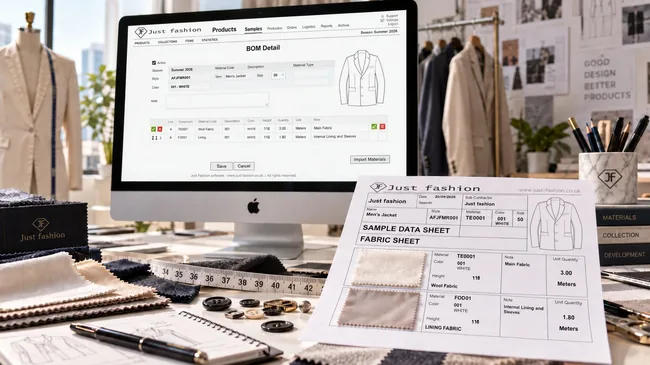
A prototype is a one-off, but it should be managed like production
During sample development, prototypes and toiles are made in tiny quantities: each garment has its own data sheet, its own materials, its own journey through the product office, pattern room, CAD and workshop. Precisely because the quantities are so small, almost nobody treats it as an industrial process: people work from spreadsheets and memory, and by the end of the season the sample fabric stock no longer matches what is actually on the shelves.
Just Fashion Samples Management applies production logic to samples: sample fabrics and trims are received and managed in a dedicated sample warehouse; the item is created quickly with essential data only; the data sheet carries the bill of materials for the sample colours and sample size only; the launch generates the production order, the barcodes and the picking list.
The process is driven by a status-based workflow, and every department has its own progress menu with its own work queue: pattern makers see confirmed data sheets that still have no pattern, CAD sees those that still have no consumption. Nobody has to ask anybody what needs doing.
The workflow needs no configuration: it is the fashion sampling workflow, the one product office, pattern room, CAD, warehouse and workshop have always worked in. There is no process-design project to tackle before you start, just a ready-made path into which garments are entered one at a time.
What used to take hours of work on spreadsheets passed around by email is now online, up to date, for everyone at the same moment.
What Samples Management covers, and what it doesn't
Samples Management is for making prototypes and toiles in small quantities: garments that are created, tried on and corrected. It is not the module for duplicates for sales agents or multi-copy sales collections: those are production runs in every sense and are handled with the Just Fashion Production & Supply Chain module, on the same style data.
Every department opens the system and sees what is theirs to do
Sample development almost always stalls for the same reason: a data sheet sitting on a desk and nobody aware of it. In Just Fashion every step of the workflow feeds the progress menu of the next department, which finds its list already waiting.
Sample warehouse
Receives the fabrics and trims intended for samples and books them into its own dedicated warehouse, separate from production stock. This is where the materials for every prototype will come from.
Product office
Creates the item record with essential data and fills in the data sheet: sample colours, sample size, cutting materials and trims. When done, it confirms.
Pattern makers
Have a progress menu showing confirmed data sheets that still have no pattern. They make the pattern for the garment and confirm it in Just Fashion.
CAD
Sees data sheets that still have no consumption, opens them and enters the sample consumption taken from the marker. Works on cutting materials and fabric widths only, with no noise.
Sample production
Launches the garment: production order, sample and prototype barcodes, picking list for the warehouse. Follows the work until the sample comes back.
Showroom
Samples can also be returned straight to the showroom: the barcodes are scanned and the system moves the status forward on its own, without going through head office.
The journey of a prototype, step by step
Every phase ends with a confirmation, and the confirmation is what makes the garment appear in the next department's list. Data entered once is never entered again.
-
Materials arrive in the sample warehouse
Fabrics and trims intended for samples are received and booked into the dedicated warehouse. This is the stock the whole development season will work from.
-
Quick item set-up
The garment is coded straight away with essential data only: at this stage speed matters, not completeness. The rest of the record will be filled in when the style goes into the collection.
-
Data sheet and sample bill of materials
The bill of materials is built for the sample colour or colours only and for the sample size: cutting materials (fabrics and linings) and trims. For cutting materials consumption is not entered: CAD will add it.
-
Data sheet confirmation and print-out
When the data sheet is complete, the user confirms it. It is usually printed and a swatch of fabric and one of lining are attached: the paper document that goes with the garment to the workshop comes from system data, not from a separate file.
-
Pattern
Pattern makers open their progress menu and find confirmed data sheets without a pattern. They make the pattern and confirm it in Just Fashion: the data sheet moves to CAD automatically.
-
Sample consumption entered by CAD
CAD sees data sheets without consumption, opens them and enters the sample consumption. It works on cutting materials and fabric widths, on a clean list. With its confirmation the bill of materials is closed.
-
Semi-automatic production launch
The garment is launched: the system creates the production order, generates the sample and prototype barcodes and prepares the materials picking list.
-
Warehouse picking, with exceptions handled
The warehouse operator picks from the list. If the exact component isn't there, it can be swapped on the fly for another one: the system records the substitution and deducts from the sample warehouse what actually went out.
-
Making and return of the sample
The garment is made up. On its return, to head office or straight to the showroom, the barcode is scanned and the progress status moves up on its own.
Every confirmation opens someone else's work queue.
No hand-overs by word of mouth or email: the data sheet moves along the workflow by itself, and whoever has to pick it up finds it in their own list.
From incoming fabric to returning sample
Every function works on the same item, material and stock data: what is entered once is never entered again.
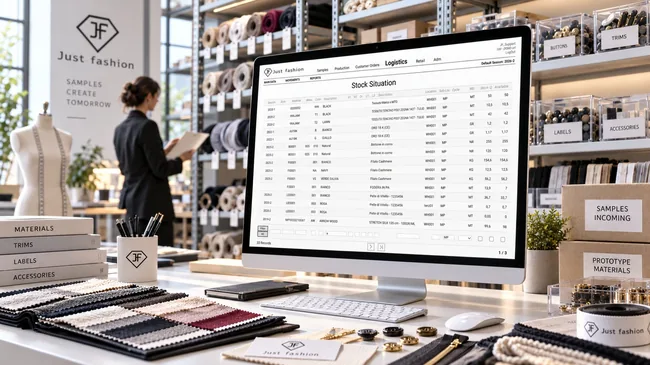
1. Sample warehouse
Fabrics and trims intended for collection development arrive and are booked into a dedicated sample warehouse, separate from production stock. It is the stock every prototype's material comes from, with quantities by item, colour and width.
Keeping it separate avoids mixing development yardage with production yardage, and tells you what is really there before a garment is launched.
- Dedicated warehouse for sample materials
- Booking-in of incoming fabrics, linings and trims
- Stock by item, colour and width
- Automatic deduction when prototypes are picked
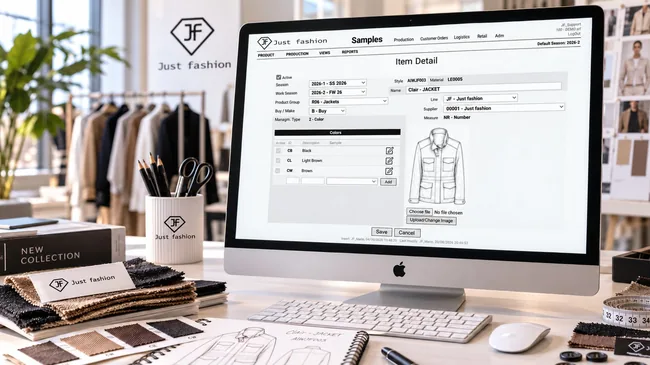
2. Quick item set-up
During sampling, speed is what counts: the item is created with essential data only, just what it needs to exist and be worked on. No long form to fill in before you can start.
A few fields are enough: season and work season, product group, line, supplier, style name and sample colours. The technical drawing or photo is attached to the style straight away, so anyone who opens it recognises it without looking elsewhere.
It is not a separate archive: it is the same finished-product and material master data used across the whole system, just more concise. If the item goes into production, it is completed with every attribute it needs (country of origin, composition, production bill of materials via import), without re-coding anything.
- Item created with the bare minimum of data
- Season, work season, product group, line and supplier
- Sample colours entered directly on the item
- Technical drawing or image attached to the style
- Same master data as the rest of the system, completed when the item goes into production
3. Data sheet and sample bill of materials
The sample bill of materials is deliberately stripped to the essentials: it covers sample colours only and the sample size, and lists the cutting materials (fabrics and linings) together with the trims.
For cutting materials consumption is not entered at this stage: CAD will enter it after the marker is made. The product office states what is needed, not how much: so the data sheet is closed quickly and the garment can move on.
Each line carries the material, its description, colour, unit of measure and usage note (main fabric, body and sleeve lining, buttons) and its class, which separates cutting materials from trims. That distinction is what later lets CAD see only what concerns it.
When the data sheet is complete it is confirmed with a flag on the BOM itself. From then on it appears in the pattern makers' list, and a second flag will record the CAD step: the data sheet carries its own status, with no parallel registers.
The data sheet is usually printed. The sample data sheet print-out is designed for the workshop: next to each material there is a box to attach the fabric and lining swatch, along with unit quantity, width and note. The sheet that goes round the company and the data in the system are one and the same.
This bill of materials does not claim to be the final one: it is the sample BOM. When the style goes into production it will be imported into the production side of Just Fashion and completed with every component, the production routings and standard costs.
- Bill of materials for sample colours and sample size only
- Cutting materials (fabrics and linings) and trims, by class
- Cutting-material consumption left to CAD
- Confirmation flag and CAD flag on the data sheet
- Print-out with boxes for fabric and lining swatches
- The same BOM then continues into production, where it is completed
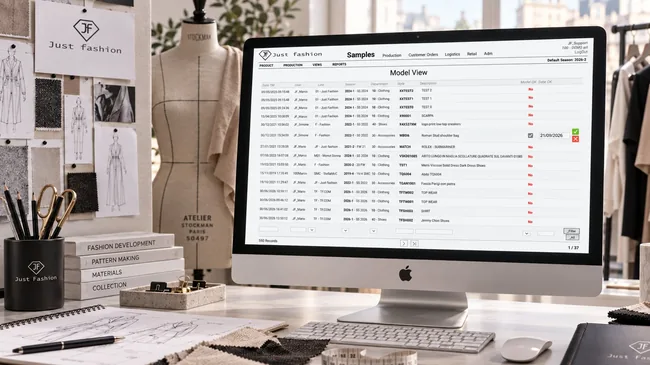
4. Pattern and the pattern makers' progress menu
Pattern makers don't wait for someone to bring them a folder: they open their own progress menu and see the list of confirmed data sheets that don't have a pattern yet. The work queue is always up to date and visible to everyone.
For each garment the view shows date entered, user, line, season, department, style and description, and above all the Model OK and Date OK columns: as long as they read "No", there is no pattern. Filters by line, season and department let each pattern maker isolate their part of the collection.
Once the pattern is done, the pattern maker confirms it from the list itself, with the date: the garment moves to the next status and appears automatically in CAD's list.
- List of confirmed data sheets without a pattern
- Model OK and Date OK columns, confirmed straight from the row
- Filters by line, season, department and style
- Automatic status change on confirmation
- No hand-overs by word of mouth or email
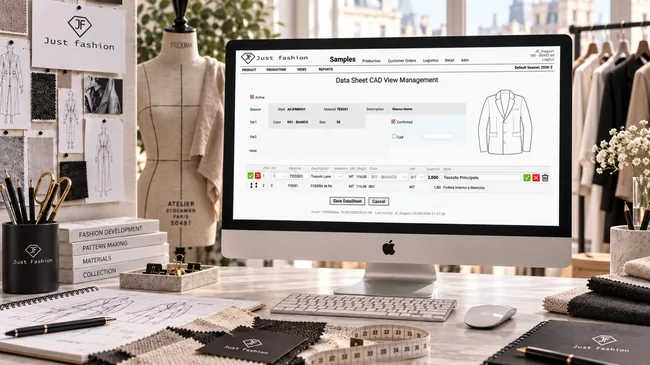
5. Sample consumption entered by CAD
CAD has its own list: data sheets that still have no consumption. It opens the data sheet and enters the sample consumption taken from the marker: real figures, not estimates made at a desk.
In this view CAD works on cutting materials and fabric widths: no trims, no lines that don't concern it. Width is part of the data, not a side detail, because the same fabric in a different width gives a different marker and therefore a different consumption.
The CAD view is a version of the bill of materials reduced to what matters: the garment at the top with style, colour and sample size, and below it only the cutting lines, main fabric and lining, each with its width and consumption. The Cad flag in the header records that the step has been done.
With CAD's confirmation the sample bill of materials is closed and the garment is ready for launch.
- List of data sheets without consumption
- View limited to cutting lines, no trims
- Fabric width and consumption for each fabric and lining
- Cad flag in the BOM header
- With CAD's confirmation the bill of materials is closed
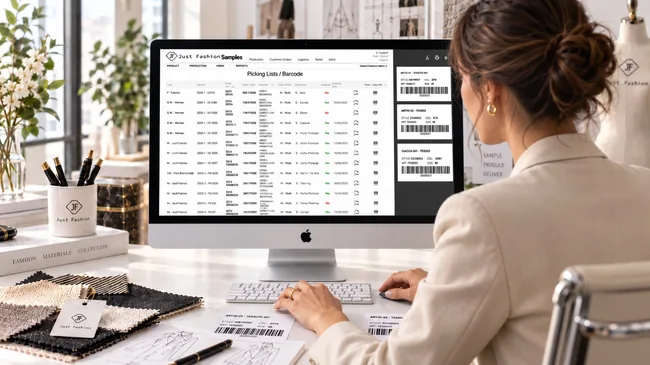
6. Production launch and barcodes
Once the data sheet is complete the garment is launched, semi-automatically: the system creates the sample production order and generates the sample and prototype barcodes.
Each order carries its reason (first prototype, second prototype, sample), the supplier or workshop it is assigned to, whether it is made or bought, and its shipping status and date. A single list follows everything that has been launched, season by season and line by line.
From the same row you print the order PDF and the barcode labels in the chosen format: the label shows style, colour, item and size, so the garment and its materials are recognisable at a glance and readable with a scanner.
From then on the garment is traceable: every scan of its barcode tells you where it is and how far it has got, with nobody updating a status by hand.
- Semi-automatic creation of the production order
- First prototype, second prototype and sample reasons
- Supplier or workshop, shipping status and date
- Order PDF and barcode labels printed in the chosen format
- Label with style, colour, item and size
- Progress updated by scans, not by hand
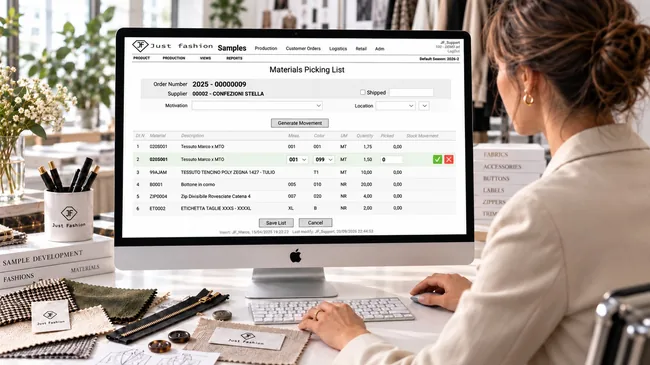
7. Picking list and component substitution
The launch produces the materials picking list: the warehouse operator knows what to take, in which colour and in what quantity. This is the moment when, in sampling, stock accuracy almost always breaks down.
Just Fashion treats it instead as an expected exception: if the listed component isn't there, the operator can pick another one and substitute it directly on the row, choosing the material or colour actually available. The row stays marked as a substitution, with a note of what replaced what: in the example, a lining in colour 099 instead of 001.
Next to the planned quantity is the quantity actually picked, and the list shows the location it is picked from, the sample warehouse. On confirmation the system generates the stock movement and deducts what really went out, not what was planned.
It is a difference you feel at the end of the season: the sample warehouse stays reliable despite the dozens of on-the-fly changes no spreadsheet can keep track of.
- Picking list generated by the launch, by order and supplier
- Material or colour substituted directly on the row
- Automatic note recording the substituted component
- Planned quantity and quantity actually picked
- Stock movement generated on the actual material
- Sample stock stays accurate despite exceptions
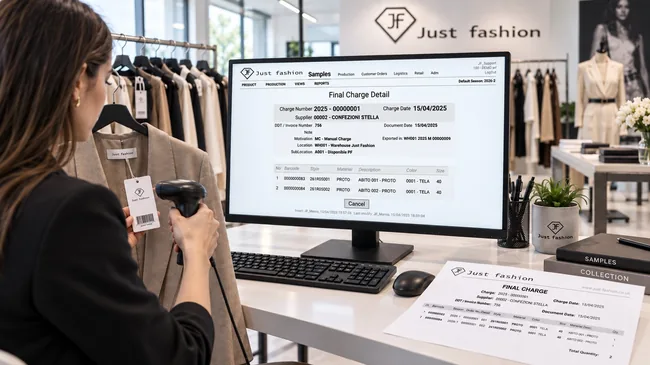
8. Sample return, including to the showroom
When samples come back from the workshop, the barcode on each garment's hang tag is scanned and the system records the final receipt: one row per garment, with barcode, style, description, colour and size. The status moves forward on its own. No list to tick off, nothing to tell anyone.
The receipt carries the supplier, the number and date of its delivery note or invoice, the warehouse and location the garments go into, and a reference to the production order it closes. The final receipt document can be printed, with the total number of pieces received.
Samples can also be returned straight to the showroom, without going through head office: garments arrive where they are needed and are registered on the spot, so progress stays accurate even when sample logistics get messy.
- Final receipt recorded by scanning the garment barcode
- One row per garment with style, description, colour and size
- Supplier, delivery note or invoice, destination warehouse and location
- Link to the production order the receipt closes
- Printed final receipt with total pieces
- Return straight to the showroom
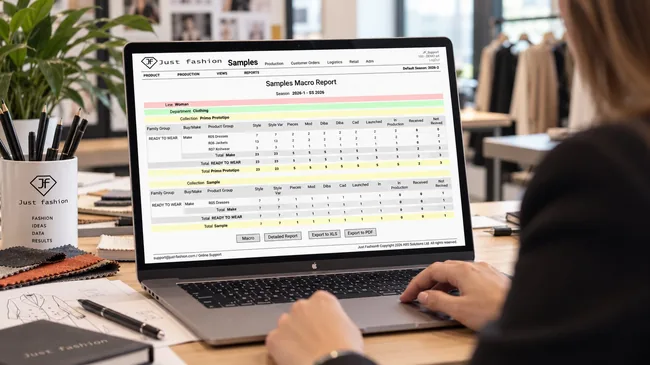
9. Progress reports and bottlenecks
The Samples Progress report puts the workflow phases in columns (styles and variants, pieces, pattern, bill of materials, CAD, launched, in production, received and not yet received) and the collection in rows, organised by season, line, family, first prototype, second prototype and sample, down to the individual product group, with subtotals at every level.
It is the drop in numbers from one column to the next that shows where a bottleneck is forming: if many garments have a pattern but no consumption yet, the problem is not a general delay in the collection, it is CAD, and that is where you step in.
In the PDF reports totals can be grouped in cascade up to three levels, chosen to match the question you want answered, for example line, family and collection, as in the report shown here. Each level has its own subtotal, with the season total at the bottom.
The same view is available in macro form, for a season-wide overview, and detailed form, down to the individual style, with export to Excel and PDF.
- Columns by phase: pattern, BOM, CAD, launched, in production, received, not yet received
- Totals groupable in cascade up to three levels
- First prototype, second prototype and sample read separately
- Subtotals at every level and season total
- Macro and detailed report, export to Excel and PDF
Where the collection is stuck, right now
Progress isn't a report someone has to compile: it is the result of department confirmations and barcode scans. You look, and you know.
Sample progress example
Illustrative figures, using the same phases as the report: for each phase, how many garments have passed it and how many are waiting before it.
| Phase | Garments | Waiting |
|---|---|---|
| BOM confirmed | 221 | 27 |
| Pattern (pattern makers) | 180 | 41 |
| Consumption (CAD) | 117 | 63 |
| Launched | 102 | 15 |
| In production | 80 | 22 |
| Received | 58 | 22 |
A bottleneck always has a name
A hundred and eighty garments have a pattern, only a hundred and seventeen have consumption. The sixty-three stuck in between are not "the collection running late": they are CAD under pressure. That is something you can act on straight away: move a resource, set a priority, bring critical garments forward, while there is still time.
Because every status moves on a confirmation or a barcode scan, nobody has to update progress: the picture is always the real one, not the one from the last meeting.
The sample warehouse stays accurate
On-the-fly substitutions, missing components, yardage taken on the spot: in sampling they are the norm, and the reason development stock is almost always unreliable. By handling substitution inside the picking process, Just Fashion deducts what really goes out and keeps the system in line with the shelf.
One set of master data, from prototype to production.
Samples don't live in a separate system. The module is fully integrated with the whole ERP: the finished-product and material master data are the same ones used by production, sales, warehouse and invoicing, just filled in more concisely, with what is needed to make the prototype.
The bill of materials is deliberately incomplete too: it holds the cutting materials and trims for the sample, not every component of the final garment. At sampling stage nothing more is needed, and asking for it would only slow the work down.
If the item goes into production, it is completed in the same archive with every attribute required: country of origin, composition, the production bill of materials via import, production routings and standard costs. Nothing starts from scratch: you carry on from what the product office and CAD have already entered.
For the same reason, duplicates for sales agents and multi-copy sales collections are launched with the production module, on the same item and the same bill of materials.
Added when the item goes into production
Where sample work carries on
- ✓Production & Supply Chain, BOM completed with routings and standard costs
- ✓Production & Supply Chain, duplicates for agents and collection production
- ✓Product Data & Costs (PDM), final technical sheet for the style
- ✓Customer Orders & Agents, catalogues and sales campaign
- ✓Warehouse & Logistics, stock, barcodes and shipping
Key Samples Management features
Available functions, organised by process area.
- ✓Dedicated sample warehouse, separate from production
- ✓Booking-in of sample fabrics and trims
- ✓Quick item set-up with essential data
- ✓Sample colours and sample size
- ✓Bill of materials with cutting materials and trims
- ✓Cutting-material consumption left to CAD
- ✓Data sheet confirmation by the user
- ✓Data sheet print-out for the workshop, with room for fabric swatches
- ✓Sample BOM later imported and completed in production
- ✓Standard sampling workflow, ready to use with no configuration
- ✓Pattern makers' progress menu: confirmed data sheets without a pattern
- ✓Pattern confirmation in Just Fashion
- ✓CAD menu: data sheets without consumption
- ✓CAD works on cutting materials and fabric widths
- ✓Automatic status change on every confirmation
- ✓Semi-automatic sample production launch
- ✓Sample production order
- ✓Sample and prototype barcodes
- ✓Materials picking list
- ✓Component substitution at picking
- ✓Stock deducted on the material actually picked
- ✓Sample return with barcode scanning
- ✓Direct return to the showroom
- ✓Progress reports by status and bottleneck detection
- ✓Reports and export to PDF and Excel
- ✓24/7 cloud access from any device
- ✓Same finished-product and material master data as the whole system
- ✓Item completed in production: country of origin, composition, BOM via import
A prototype deserves the same rigour as production.
We'll show you how a sample data sheet is created, how it moves to pattern makers and CAD, how the garment is launched with its barcodes, and how stock stays accurate even when a component is swapped at picking.