


CUSTOMER ORDERS & AGENTS
Customers, agents, showrooms, e-commerce and marketplaces in a single order book: from the selling campaign to delivery, to electronic invoicing, to returns.
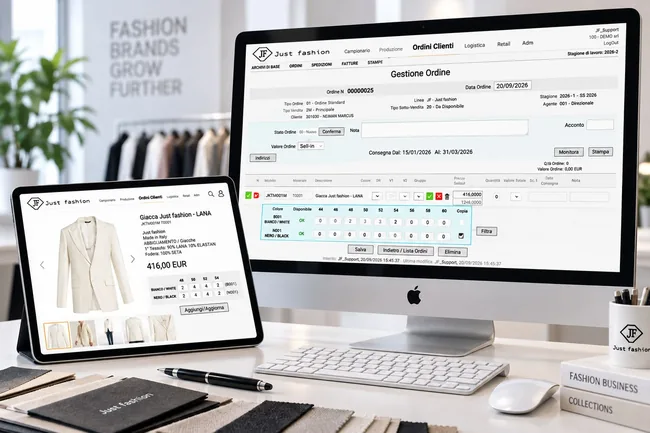
Complete omnichannel control of your sales
The complexity and the pace of modern sales networks call for a flexible platform, built natively for fashion. Just Fashion OMS manages the sales network, the customer, order intake, invoicing and after-sales within one single system.
It supports selling from physical and digital showrooms, agents and sub-agents, distribution companies, collection orders (selling campaign), in-season replenishment and sales from available stock. Every operator sits in a hierarchy inside the system and works online on the company's processes with dedicated permissions.
Native omnichannel connectors centralise orders coming from the main marketplaces and e-commerce platforms, including JOOR B2B, Farfetch FPS, Shopify Plus, Magento, PrestaShop, WooCommerce, Intramirror and Cettire, with no duplicated data and no manual reconciliation.
Real-time stock availability automatically reserves the goods the moment the order is taken, removing the risk of overselling and of stock-outs across every integrated channel.
Everyone enters from their own door, the data stays the same
A fashion sales network is not made of one kind of user. Just Fashion OMS gives each of them the right tool, with their own permissions, on top of a single database of customers, catalogues, price lists and stock.
Customer service
Checks, corrects and confirms the orders of the whole network, manages credit limits and terms, issues order confirmations and follows delivery progress.
Agents, sub-agents and distributors
Enter orders for their own customers wherever they are, see only the customers, brands and price lists they are entitled to, and follow commissions and budgets.
Physical and digital showrooms
During the selling campaign they work on the interactive catalogue with images, colour cards and size scales, turning the presentation into an order without going back through Excel files.
Digital channels
E-commerce, marketplaces and digital wholesale platforms pour their orders into the same order book, under the same availability and fulfilment rules.
Every order already knows what it has to do
In fashion a "customer order" is not one single thing. Just Fashion tells the types apart and, above all, gives every order a selling type that drives its behaviour through the whole process.
Pre-orders, goods still to be produced
These are the orders collected during the selling campaign on the collection catalogues, when the goods do not exist yet. They are taken against delivery windows and expected availability dates, not against real stock.
Once confirmed they become demand: they feed planning and production orders, and the goods are made on the basis of what has been sold.
Available stock and replenishment
These are orders entered on goods that already exist: in-season replenishment, sales from available stock, pronto moda. The operator works on real stock and sees what is there and in which sizes.
They commit the goods immediately: availability updates in real time across every channel and the order can be shipped straight away.
The two flows stay separate in the way they are handled but joined in the order book: delivery progress, budget, statistics and invoicing see the collection pre-order and the replenishment together, while production and the warehouse each receive what belongs to them.
The code that governs how the order behaves
Every customer order carries a code and a sub-code, which in Just Fashion are called Selling type and Sub selling type. They are not a label that only serves statistics: they are the information that links the order to the sales channel and that makes the system react differently.
The rules the order will follow depend on it: which price lists and terms to apply, how to commit the goods, which documents to produce, how to classify the sales in the analytics.
That is what makes the customer order the tool that orchestrates everything: one single document, different behaviours depending on what it represents.
Some examples of selling type
Selling types are configured according to how the company is organised.
Wholesale
Digital B2B platforms
E-commerce and marketplaces
Commercial formulas
Internal movements
Store-to-store transfers are orders too
The same tool moves goods inside the network: a transfer from one store to another travels as an order, with its own selling type, and moves stock under the same rules and with the same traceability as a sale.
The store replenishes by itself. If it has access to the central warehouse it opens an order on available stock, sees in the catalogue what is really there and in which sizes, and enters what it needs. Logistics receives a request that is already complete and ships it.
No Excel lists sent by email, no phone calls to find out whether a garment is there, no requests for goods that are already sold out: the store works on real stock, exactly as a customer would on available goods.
The result is that all the movement in the company, towards the customer and inside the network, goes through one single mechanism instead of separate procedures to be reconciled.
The cycle of a selling campaign
From the opening of the collection to the invoice, every step reuses the data of the previous one. The result is an order book that is always aligned, and on which production, warehouse and administration all rely.
-
Campaign opening and catalogues
Collection, price lists, commercial terms, delivery windows and digital catalogues are made available to the network. Every operator sees what they are entitled to.
-
Order intake from every channel
Showrooms, agents, customer service, e-commerce and marketplaces enter collection orders, replenishment or sales from available stock. Everything flows into the same order book.
-
Check, credit limit and confirmation
Every order has a progress status, and moving from one status to the next is what brings the order to confirmation: administrative check, agent confirmation, customer service pre-confirmation, a proforma invoice where a deposit is required, final confirmation. The statuses are not fixed: every company defines its own.
-
From the sale to production
Confirmed orders become demand: they feed planning and production orders, or they are allocated to stock that is already in the warehouse.
-
Allocation, picking and shipping
The system generates picking lists, guides packing with barcode or RFID and issues carton labels, packing lists and delivery notes.
-
Invoicing and after-sales
Electronic invoicing, management of deposits and, where needed, return authorisation (RMA), stock reinstatement and a credit note linked to the original invoice.
Every channel, the same availability.
An order from a showroom, one from an agent, one coming from JOOR and one from the e-commerce all commit the same goods and follow the same path. No manual reconciliation between systems, no risk of selling the same garment twice.
Full management of sales, sales network and orders
From the customer record to the shipment, from electronic invoicing to returns: every process shares the same data, with no duplication.
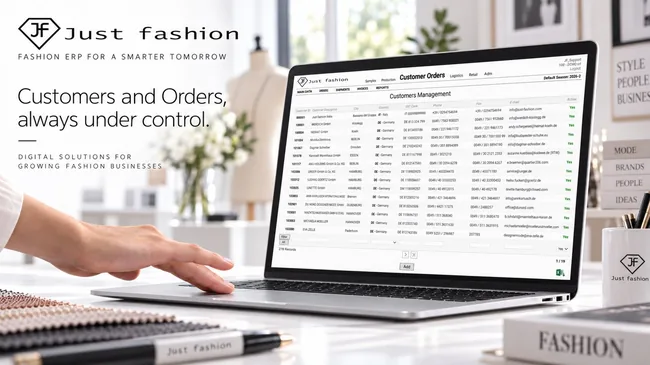
1. Customer records and commercial data
Customer data is available in real time from any device: payment terms, multiple delivery addresses, customised commercial terms, multi-currency sales price lists, the full history of orders and invoices, seasonal budget and sales statistics.
- 360° customer profile and management of multiple shipping addresses
- Customised commercial terms, credit limit and payment terms
- Full history of orders, delivery notes, invoices and credit notes
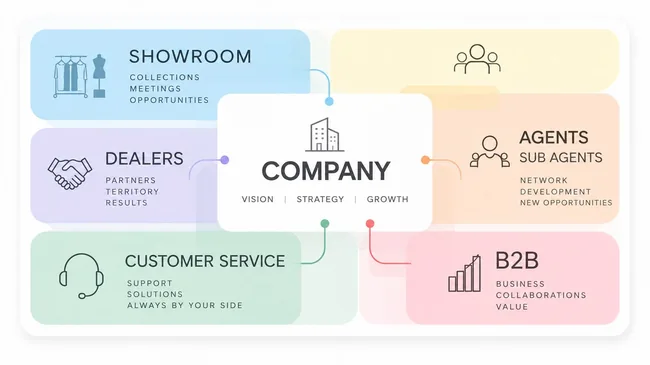
2. Agents, sub-agents and showroom network
The sales network works online, with no data synchronisation at all. The dynamic structure of Just Fashion makes it possible to build precise hierarchies between operators: customers, showrooms, distributors, agents and sub-agents. Access profiling guarantees that each user sees only the information, the customers and the catalogues they are entitled to.
- Flexible hierarchy between showrooms, distributors, agents and sub-agents
- Automatic commission calculation for agents and sub-agents
- Granular permissions by area, brand, customer and price list
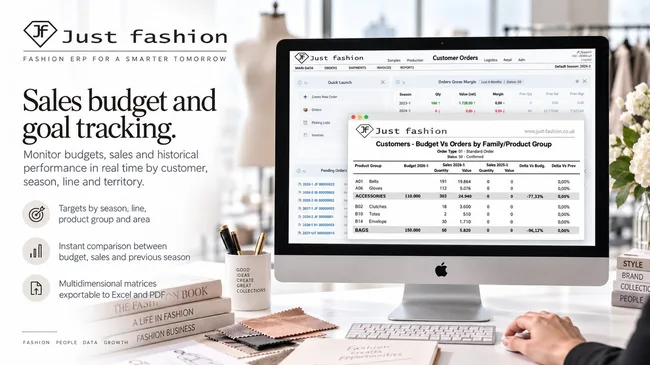
3. Sales budget and target monitoring
For every customer, agent or territory you set and monitor the sales budget by season, line, product family and geographical area. A business intelligence tool extracts sales progress in real time, against the planned budget and against previous periods.
- Targets by season, line, product family and area
- Real-time comparison between budget, sales and previous season
- Multi-dimensional matrices exportable to Excel and PDF
4. Fast and smart order entry
Customer orders are handled in an intuitive, fast way: customer service, agents and showrooms enter collection orders, replenishment or orders on goods available in the warehouse from any device. Dedicated functions cut the work down: copying orders between destinations, interactive digital catalogues and catalogue generation for the presentation to the customer.
Collection catalogues with product images are generated in PDF, Excel and HTML: PDF for presentation and printing, Excel for whoever works on data and quantities, HTML for sending out and browsing online, including on tablet and phone.
The whole order can also be seen and edited in a single grid, like an Excel sheet: every line in front of you, quantities editable directly, without entering and leaving a screen for each style. It is the way operators already work, but on top of the real ERP data.
When the order arrives already filled in from outside, for example from a buyer or from a chain that works with its own files, it is loaded through CSV import instead of being retyped by hand.
- Collection orders, replenishment and picking from available stock
- Collection catalogues with product images in PDF, Excel and HTML
- View and edit the whole order in a single grid, like an Excel sheet
- Fast duplication of orders between customers, branches and stores
- Order import from CSV files
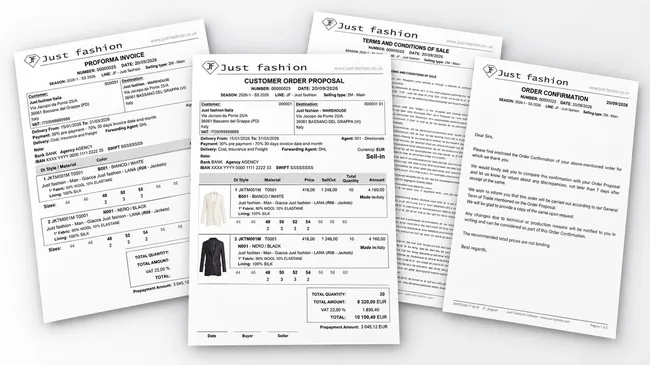
5. The order documents: proposal, proforma and confirmation
At any moment you can print the order proposal in PDF, complete with the company's terms of sale. Operators generate statistical summaries grouped by style, fabric and colour, at wholesale or retail price. After customer service validation the system issues the official order confirmation, and where needed the proforma invoice for the advance payment.
Since Just Fashion is a multilingual system, every document is printed in the customer's language, with customised terms and conditions of sale and, as you prefer, with or without product images: the illustrated version for the showroom and the buyer, the compact one for administration.
- Order proposal, proforma invoice and order confirmation in PDF
- Multilingual documents, in the customer's language
- Printing with or without product images
- Customised terms and conditions of sale
- Detail by style, fabric, colour variant and size scale
- Deposit calculation, credit limit check and automatic sending to the customer
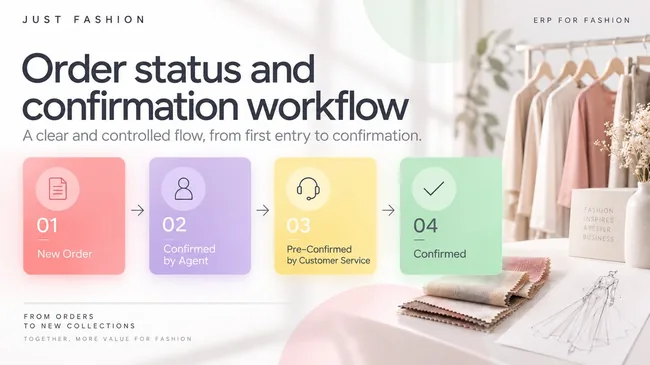
6. Progress statuses and confirmation workflow
Every customer order has a progress status, and the workflow takes it from one status to the next: from the first entry ("New order") to the administrative check and the credit limit verification, through to "Confirmed" and "In production". The status says at any moment where the order stands and who has to act.
It is the mechanism that holds the whole confirmation process together: until an order has passed the required checks it does not move forward, and until it is confirmed it commits neither production nor stock.
The number and the names of the statuses are defined company by company. A lean network can work with three steps, a structured group with multi-level approvals can have many more: the configuration follows the internal rules, not the other way round.
- Progress statuses configurable in number, name and sequence
- Block on order entry and document generation for credit limit or overdue payments
- Protection and freezing of orders during the production order phases
- Immediate visibility on where every order in the book stands
An example of a status chain
A typical configuration for a network with agents, where the order changes hands before becoming final.
The proforma invoice is issued from the "Pre-confirmed" status. It is the document used to ask the customer for the advance payment: the order stays where it is, committed but not yet final, until the deposit has been received.
Once the prepayment is in, the order moves to "Confirmed" and from that moment it feeds production, allocation and delivery.
This is only an example: number, name and sequence of the statuses are defined company by company, together with the checks that govern each step. A lean network can work with three statuses, a group with multi-level approvals uses many more.
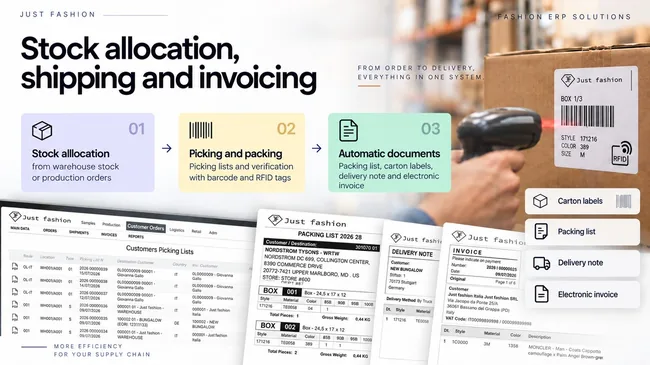
7. Stock allocation, shipping and invoicing
To be shipped and invoiced, the confirmed order is allocated to warehouse stock or pre-allocated to the incoming production order. The system generates picking lists for the operators and guides packing with barcode or RFID scanning.
During packing the cartons are built: every garment is assigned to its carton, from which the system produces the carton packing list, detailing what each one contains, and the carton labels to be applied to the box. Whoever receives the goods knows exactly what is inside, and inbound checks become quick.
At the end, delivery notes and the electronic invoice are issued.
- Stock allocation from the warehouse or from production orders
- Picking lists and packing verification with barcode and RFID tags
- Carton building and packing list with the content of each carton
- Printing of carton labels
- Issue of delivery notes and electronic invoices
- Mandatory export information already on the documents: HS code, composition, Made in, weight
- Customs summary, CITES declaration and free export declaration where required
Export-ready documents, with one click
Shipping documents do not carry only quantities and prices: they contain all the information required for export, because it is already in the product record. HS code, composition, country of origin (Made in) and weight reach the document without being filled in again by hand.
To these are added the customs summary and, where needed, the Washington Convention (CITES) declaration for protected materials and the free export declaration. These are documents usually prepared by hand, line by line, and that here are generated together with the shipment.
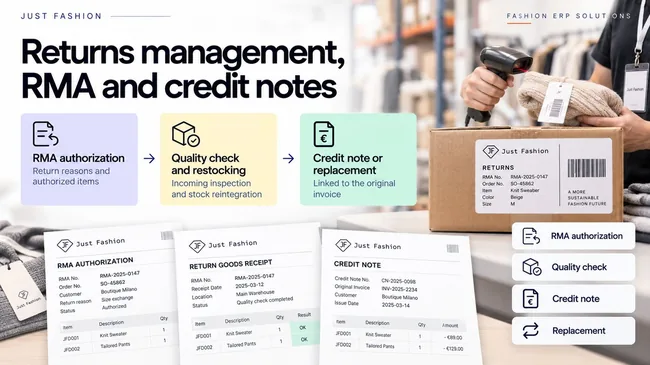
8. Returns management (RMA) and credit notes
After-sales service guarantees transparent handling of returns, replacements and credit notes. The process starts with the return authorisation, where customer service records the garments to be received and the related reason code. When the goods arrive at the warehouse the workflow allows stock to be reinstated and the replacement or the immediate issue of the credit note to be processed.
- Structured return authorisation (RMA) with analytical reason codes
- Inbound quality control and automatic stock reinstatement
- Credit note linked to the original invoice

9. Business Intelligence and management control
Sales flows turn into decisions. The Business Intelligence module extracts analytical reports and statistics in real time, in PDF and Excel: overall sales, turnover, season comparison, delivery progress and customer classification by agent, product family, distribution channel and country.
- Multi-dimensional sell-in and sell-out reports in PDF and Excel
- Monitoring of delivery progress, order book and backlog
- Analysis by agent, geographical area, collection line and category
The margin is visible while you sell, not at the end of the season
The selling price is in the order, the product cost is already in the ERP. Just Fashion crosses the two and calculates profitability in real time, while the selling campaign is still open and decisions can still be made.
Every channel, each with its own margin
Wholesale, e-commerce, marketplaces, retail and consignment do not have the same profitability. Since all orders live in the same order book and carry their selling type, the margin can be read channel by channel and compared without separate extractions to reconcile.
The calculation uses the terms actually applied: tiered discounts, price lists by market and currencies. It is the margin of the real order, not the theoretical one from the price list.
The figure is available as a widget inside Just Fashion, for those who want it at a glance, and can be exported to PDF and Excel for analysis and sales meetings.
Two cost bases, your choice
Profitability can be calculated on two different values, depending on the moment and the purpose of the analysis.
Standard cost
Calculated from the bill of materials: materials, consumption, operations and trims of the product. It is available right from collection development, so margins can be considered while the selling campaign is still running.
Actual average cost
The real cost accrued on the goods. It shows what they actually cost, and it is what you use when you want to measure actual profitability rather than planned profitability.
How profitability is read
- ✓By channel: wholesale, e-commerce, marketplace, retail, consignment
- ✓By customer, agent, geographical area and market
- ✓By season, line, style, colour and size
- ✓By single order, down to the line
- ✓Comparison between channels and between seasons
Decide in time, instead of explaining afterwards
Seeing the margin during the selling campaign changes the choices you can make: understanding which line really pays off, which customer absorbs too much discount, which channel is growing at the expense of profitability. At the end of the season the same figure only serves to explain what happened.
Digital orders come in through the same door.
Digital wholesale platforms, e-commerce sites and marketplaces do not live apart: their orders arrive in the Just Fashion order book with the same customer records, the same price lists and the same availability as the orders taken by agents and showrooms.
Just Fashion therefore acts as a multichannel OMS: one place to see everything that has been sold, one stock to draw from, one fulfilment and invoicing process.
Native connectors
- ✓JOOR B2B, digital wholesale showroom
- ✓Shopify and Shopify Plus, e-commerce and POS
- ✓Farfetch FPS, luxury marketplace
- ✓Magento, PrestaShop and WooCommerce
- ✓Intramirror and Cettire
Key OMS features
The available functions, organised by process area.
- ✓Customer, agent and distributor records
- ✓Commercial terms and tiered discounts
- ✓Customer budget management and progress
- ✓Multi-currency sales price lists
- ✓Commission calculation for agents and sub-agents
- ✓Permissions by area, brand, customer and price list
- ✓Collection orders (pre-orders) destined for production
- ✓Stock orders: available warehouse stock and replenishment
- ✓Interactive online catalogue and catalogues with images in PDF, Excel and HTML
- ✓Order visible and editable in a grid, like an Excel sheet
- ✓Order import from CSV files
- ✓Delivery windows and availability dates
- ✓Order proposal, proforma and order confirmation in PDF
- ✓Multilingual documents, with or without product images
- ✓Customised terms and conditions of sale
- ✓Progress statuses configurable for every company
- ✓Proforma invoice and deposit collection before confirmation
- ✓Confirmation workflow with credit limit check and approvals
- ✓Block on order entry and documents for credit limit or overdue payments
- ✓Orders from digital channels in the same order book
- ✓Selling type and Sub selling type by channel and commercial formula
- ✓Consignment and store-to-store transfers handled as orders
- ✓Stock allocation and picking lists
- ✓Packing with barcode and RFID and carton building
- ✓Carton packing list and printing of carton labels
- ✓Export documents with HS code, composition, Made in and weight
- ✓Customs summary, CITES and free export declarations
- ✓Deposit invoicing and electronic invoicing
- ✓Returns (RMA), replacements and credit notes
- ✓Business Intelligence with PDF and Excel reports
- ✓Real-time profitability by channel, customer and product
- ✓Margin widgets and export to PDF and Excel
- ✓Delivery progress, order book and backlog
One control room for the whole sales network.
We show you how a selling campaign is opened, how agents and showrooms enter orders, how customer service confirms them and how the goods reach the customer with invoice and tracking.