


SHIPPING, INVOICING & RETURNS
From confirmed order to delivered goods: stock allocation, barcode picking and packing, cartons and packing lists, delivery notes and e-invoices, export documents already filled in, returns and credit notes linked to the original invoice.
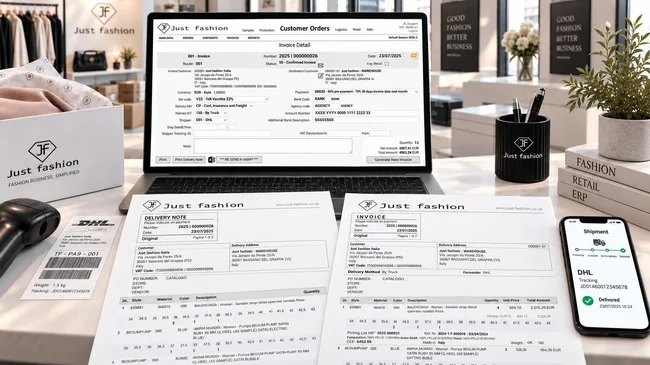
This is where you find out whether the data was right
Shipping and invoicing are where all the earlier work turns into a document: the customer, the terms, the prices, the goods, the weights, the compositions, the customs codes. If that data lives in different systems, it gets copied by hand here, and this is where errors are born: the wrong carton, the invoice that has to be cancelled, the customs paperwork done twice.
In Just Fashion outgoing documents are not filled in: they are generated, according to rules set upstream. The confirmed order is allocated to stock, picked and packed with barcode or RFID scanning; the system builds the cartons, prints packing lists and labels, issues the delivery note and the e-invoice and sends it to the tax authority. Mandatory export information comes from the product master data, never re-typed.
The same mechanism serves every channel (wholesale, e-commerce, marketplaces, stores, consignment and internal transfers), with one customer database and one warehouse, and with document numbering organised the way the company needs it: a single sequence, or separate sequences by channel and by document type. And when goods come back, the return starts from the original document: authorisation, inspection, restocking and a credit note linked to the invoice.
The right document is decided upstream, not at the shipping desk
Shipping to a wholesale customer, restocking a store in the chain, moving goods between two stores, sending goods out on consignment: for the warehouse they are all shipments. In Just Fashion they are all orchestrated by customer orders.
Every order carries its own reason code. Through stock allocation, and according to predefined rules, the order becomes a picking list. The same rules also decide which document will leave the warehouse: delivery note, immediate invoice, or a valued pro-forma invoice for goods going abroad, with the right numbering sequence and print layout.
The document issuing process is therefore defined once, upstream. Warehouse staff don't need to know whether a shipment needs a delivery note or an invoice, whether it goes to Italy or abroad, whether it is a sale or a transfer: they press the button and get the correct document.
From reason code to document
The path every shipment follows, with no choices left to the operator.
The flow
What the rule decides
For which shipments
One button, the correct document
The decisions that normally fall on the operator at the moment of shipping, and that cause most errors, are made once, when reason codes and rules are configured. From then on the warehouse executes, and accounts find documents already consistent with the channel, the destination and the planned numbering.
Customers, stores, transfers: they are all shipments
The channel changes how the order comes in, not how the goods go out. Every flow goes through the same allocation and the same picking; it is the order's reason code, through the rules, that decides which document goes with it.
Wholesale
Customers, agents and showrooms: the collection or replenishment order is allocated, picked and shipped with delivery note and invoice, plus export documents when the destination is outside Italy.
E-commerce and marketplaces
Shopify and marketplace orders arrive in real time. One click issues the invoice, fulfils the order, updates stock and prints the label of the most cost-effective carrier for that shipment, and tracking goes back to the store.
Stores and POS
Store sales flow into the ERP, and sales receipts can be reported to the tax authority of the country where the store is located. When the customer asks for one, a sales invoice is issued, with the same master data as the rest of the company and, if needed, a numbering sequence dedicated to stores.
Consignment and transfers
Goods on consignment and transfers between stores travel as orders, with their own reason code, and leave with a delivery note or, for foreign destinations, a valued pro-forma invoice. They move stock with the same rules and the same traceability as a sale.
From confirmed order to credit note
Every step reuses the data from the previous one. The warehouse works with a scanner in hand, accounts find the documents already prepared.
-
Stock allocation
The confirmed order is allocated to warehouse stock or pre-allocated to an incoming production order. Availability is updated immediately on every channel.
-
Picking list
The system generates picking lists for operators, with the items to pick by style, colour and size.
-
Barcode or RFID packing and carton building
Every item is scanned and assigned to its carton. The check is done by the scan, not by eye: anything that doesn't match the order shows up immediately.
-
Packing list and carton labels
The completed cartons produce the packing list, with the contents of each carton, and the labels to put on the boxes.
-
Delivery note, invoice and export documents
Delivery note and e-invoice are issued, with HS code, composition, country of origin and weight already on the documents, and customs summary and declarations where required.
-
Shipping and tracking
The carrier label is generated from the same flow, and the tracking number stays linked to the shipment.
-
E-invoice transmission
The e-invoice goes to the Italian SDI exchange system, or to other European tax authorities, with no external steps.
-
Return and credit note
If goods come back, the return is authorised with its reason code, inspected on arrival, restocked, and closed with a replacement or a credit note linked to the original invoice.
Data goes in once, and comes out on every document.
Customer, terms, prices, compositions, weights and customs codes are already in the system. Every outgoing document takes them from there, instead of asking someone for them again.
Fulfilment, documents and after-sales in a single flow
All modules work on the same orders, the same stock and the same master data: no exporting to other programs just to print a delivery note or an invoice.
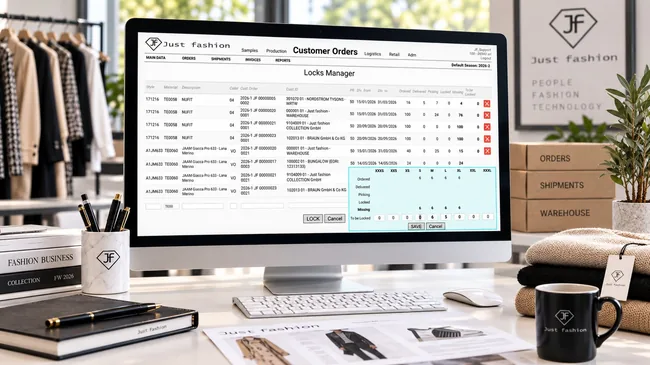
1. Stock allocation and picking lists
To be shipped, the confirmed order is allocated to warehouse stock or pre-allocated to an incoming production order: the goods for that customer are committed and cannot be sold twice, on any channel.
The stock allocation screen lists, by style and colour, every customer order waiting for those goods, with its delivery window. For each one you see ordered, delivered, in picking, allocated and missing: it is clear at once who has been served and who is still waiting.
Allocation is done size by size: opening the row shows the size grid with the missing quantities and the quantities to allocate, which can be edited. When there isn't enough stock for everyone, you decide who to serve first, by delivery date, by customer or by channel, instead of leaving it to chance.
From the allocation, applying the predefined rules linked to the order's reason code, the system generates picking lists for warehouse operators, organised by order, with style, colour and size for every item. The list already knows which document it will produce at the end of packing.
- Allocation from stock or from an incoming production order
- For each order: ordered, delivered, in picking, allocated, missing
- Allocation by size, with editable quantities
- Priority between customers when stock is short
- Availability updated in real time on every channel
- Picking lists by order, style, colour and size
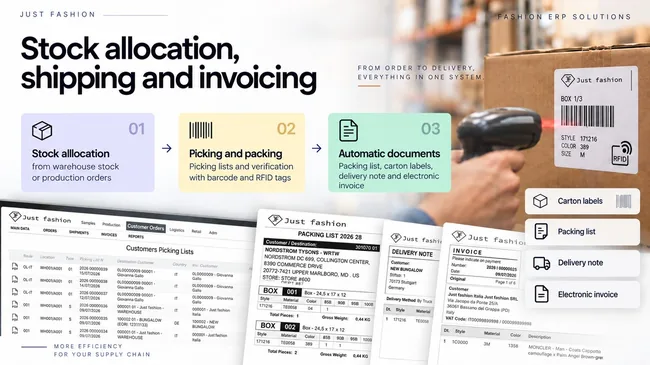
2. Barcode or RFID packing, cartons and packing lists
Packing is driven by barcode or RFID scanning: every item scanned is checked against the order and assigned to its carton. An extra item, a wrong size or a different colour shows up there and then, not when the customer opens the box.
From the completed cartons the system produces the carton packing list, detailing what each carton contains, and the carton labels for the boxes. Whoever receives the goods knows exactly what is inside, and goods-in checks become quick.
- Packing checked with barcodes and RFID tags
- Cartons built item by item
- Packing list with the contents of each carton
- Carton label printing
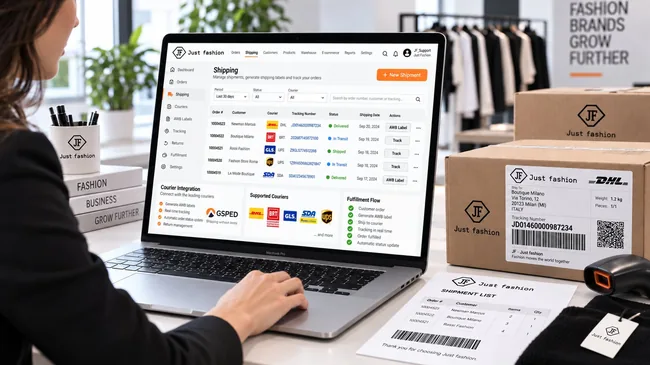
3. Carrier shipping and tracking
The carrier label isn't prepared on another portal. Just Fashion is integrated with GSPED, a multi-carrier platform with more than 300 carriers: the AWB label is generated from the same flow as the invoice, and the tracking number stays linked to the shipment.
For e-commerce orders it takes one click: shipping invoice, fulfilment, stock update and AWB label. Fulfilment goes back to the store with tracking, and the customer automatically receives the shipping email.
And the operator doesn't choose the carrier. Once the service level is set (24-hour express or standard 3 to 5 days), with the correct configuration Just Fashion can pick, for every single shipment, the cheapest carrier for the same service, based on the contracts in place. Again, with one click.
All shipments are followed from a single view: order, customer, carrier, tracking number, status (shipped, in transit, delivered) and shipping date, with filters by period, status and carrier. The delivery outcome comes back into the ERP and updates the order, without anyone checking the carrier's website.
- GSPED integration, more than 300 carriers
- Single view of shipments with status and tracking
- Delivery outcome recorded on the order
- AWB label generated by the ERP
- Tracking linked to the shipment
- E-commerce: invoice, fulfilment, stock update and label in one click
- Fulfilment with tracking to the store and email to the customer
- Automatic choice of the cheapest carrier for every shipment
The most cost-effective carrier, shipment by shipment
Online sellers usually work with several carriers and several contracts, and no operator can compare rates for every parcel. Once the service level promised to the customer is set and the system is configured correctly, Just Fashion picks for each shipment the carrier that, for the same service, costs least under the company's contracts. The savings add up parcel after parcel, with no extra work.
4. Delivery note, immediate invoice and deferred invoice
At the end of packing, transport and sales documents are issued. Depending on the customer and the channel, you work with an immediate invoice, which travels with the goods, or with delivery notes and a deferred invoice, which groups the period's deliveries into a single document.
Which document to issue is decided by the rules linked to the order's reason code: document type, numbering sequence, market and country filters, print layout. The operator doesn't choose: they press the button and the document comes out correct. Because Just Fashion is multilingual, every document is issued in the customer's language, with their terms.
Many companies want separate numbering, and Just Fashion handles it: you can have separate numbering sequences per channel (wholesale, e-commerce and stores) and, if you wish, also a separate sequence per document type: prepayment invoice, immediate invoice, deferred invoice, credit note.
The invoice detail already holds everything it needs: the rule that generated it, invoice and delivery customer, currency, VAT code, Incoterm and delivery method, carrier and tracking, payment terms (including split terms, such as a prepayment and the balance at a due date) and any VAT exemption declaration. From there you print the invoice and delivery note, generate the XML file and, if needed, resend it to the tax authority.
Printouts show the size grid with quantities for each style, and export documents also show composition, country of origin, customs code and weight.
- Delivery note generated from the shipment
- Incoterm, delivery method, carrier and tracking on the document
- Split payment terms: prepayment and balance at due date
- Printouts with size grid by style and colour
- Immediate invoice or deferred invoice from several delivery notes
- Separate numbering by channel and by document type
- Market and country rules and print layouts
- Multilingual documents, in the customer's language
Separate numbering, by channel and by document type
Accounts often want sales to be told apart in the numbering too: e-commerce invoices from wholesale ones, store invoices from all the others. In Just Fashion every channel can have its own numbering sequence, and within the channel you can separate further by document type.
Those who prefer a single sequence keep it. Those who want to separate configure it once, and from then on every document gets the right number without anyone having to choose it.
By channel
By document type
5. E-invoicing in Italy and Europe, pro-forma and deposits
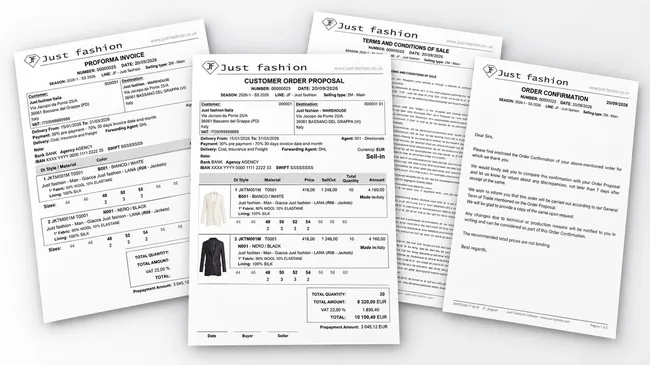
Invoices are issued electronically and sent to the Italian tax authority's SDI exchange system straight from the ERP, for every channel, stores included, each in its own numbering sequence.
Integration doesn't stop at Italy. Just Fashion has built an integration with fiskaly, a European fiscalisation platform, already verified with a live test: through fiskaly the ERP can connect to the tax authorities of other European countries, for both invoices and store sales receipts. Companies with branches, stores or subsidiaries abroad handle each country's electronic requirements from the same system, instead of adding a local program for each one.
Countries covered by fiskaly: store fiscalisation and sales receipts
Countries covered by fiskaly: e-invoicing
Before shipping, where needed, a pro-forma invoice is issued to request payment in advance: the order stays committed but on hold until the deposit is received. Deposits received are then taken into account in the final invoice.
Credit control works here too: if the credit limit is exceeded or there are unpaid invoices, document generation is blocked, and the goods don't go to someone who shouldn't receive them.
- E-invoicing and SDI transmission from the ERP
- fiskaly integration for European tax authorities
- Invoices and store sales receipts, in Italy and abroad
- Pro-forma invoice for advance payment
- Deposit management up to the final invoice
- Documents blocked when credit limit is exceeded or invoices are unpaid
- Invoice on request for store sales too
6. Export-ready documents
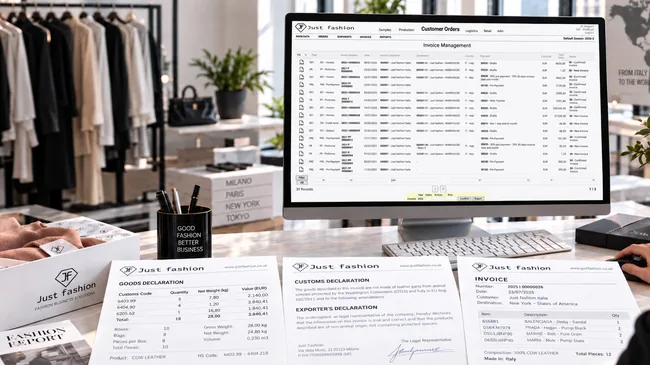
Shipping documents don't just carry quantities and prices: they contain all the information required for export, because it is already in the product master data. HS code, composition, country of origin and weight reach the document without being filled in by hand.
The customs code is often the slowest piece of data to obtain, item by item. Just Fashion also hands it to AI: starting from the product data (type, composition, materials), artificial intelligence generates the HS code and writes it into the master data, ready for every document that follows.
The customs summary groups the shipment by customs code, with quantity, weight and value for each, and shows cartons, packages, gross weight, net weight and volume. Where required, the Washington Convention (CITES) declaration for protected materials and the free export declaration are added. These are documents usually prepared by hand, line by line, and here they are generated together with the shipment.
- HS code, composition, country of origin and weight on documents
- HS codes generated with AI from product data
- Customs summary
- CITES declaration for protected materials
- Free export declaration
- Valued pro-forma for consignment and transfers abroad
7. Returns (RMA) and credit notes
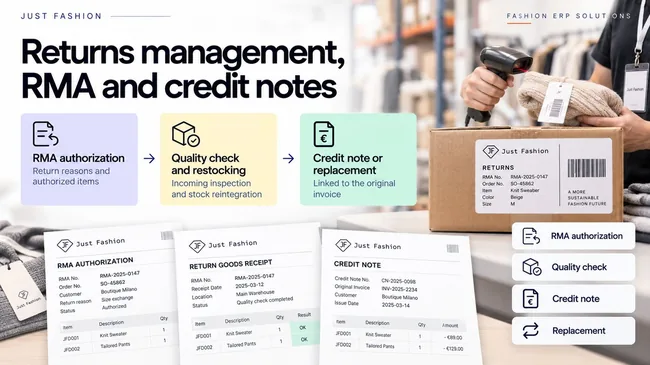
A return starts with an authorisation (RMA): customer service records the items the customer will send back and the reason for the return, starting from the original sales documents. No returns turning up that nobody was expecting.
On arrival at the warehouse, items are scanned and go through quality control; those that pass are restocked and become available for sale again. The case is closed with a replacement or a credit note, linked to the original invoice and generated without re-entering data.
- Return authorisation (RMA) with detailed reason codes
- Return linked to the original sales document
- Incoming quality control and restocking
- Replacement or credit note linked to the invoice
- Return statistics by reason, customer and product
8. Consignment and transfers
Goods sent out on consignment leave with their own order, identified by its reason code, and travel with a delivery note or, if the destination is abroad, with a valued pro-forma invoice. They remain the company's property until they are sold, and the system always knows where they are and at which customer.
The same applies to transfers between stores and sites: delivery note in Italy, valued pro-forma abroad, so even goods not yet sold have the right documents to clear customs.
What is sold is invoiced when the customer reports it; what is unsold comes back to the warehouse through the same mechanism as a return. At any time you can see what is still on consignment, what has been invoiced and what needs to come back.
The consignment cycle
Then, for each item
Always visible
The warehouse can be outside. Control stays inside.
Many fashion companies outsource their warehouse to an external logistics provider. Just Fashion integrates via API with external logistics systems, WMS and 3PL: the orders to fulfil start from the ERP, and the logistics provider works with its own tools.
Depending on the flow you want, the integration can go beyond a simple exchange of orders. As with e-commerce, the logistics provider itself asks Just Fashion, via API, to issue the invoice, delivery note and other documents in the ERP, and receives them back via API, ready to travel with the goods.
The result is that even when the warehouse isn't yours, documents, numbering and tax data stay in the ERP: with the same rules, the same numbering sequences and the same e-invoice transmission as shipments made in-house.
Your logistics provider isn't connected yet? We'll connect it.
At the customer's request we develop a custom integration with the WMS or 3PL you have chosen, even if we have never connected it before. Integrating Just Fashion with external logistics systems is something we have done for years: it is one of our core skills.
An example flow
The flow is defined company by company, according to how the logistics provider works.
Order to fulfil
Just Fashion sends the allocated order via API to the logistics provider's system.
Picking and packing
The logistics provider prepares the goods with its own tools.
Document request
Via API, the logistics provider asks Just Fashion to issue the invoice or delivery note.
Documents issued in the ERP
Just Fashion generates them with its rules and numbering sequences, and sends them back via API.
Shipping
The goods leave with the correct documents; status and tracking come back into the ERP.
The errors that never reach the customer
Shipping and invoicing are where an error costs most: a return, a credit note, goods stuck in customs, an unhappy customer. The best way to manage them is to stop them happening.
The wrong item never gets into the carton
Barcode or RFID packing checks every item against the order: wrong size, colour or style is flagged before the box is closed.
The customs data is already there
HS code, composition, country of origin and weight come from the product master data. Nobody copies them by hand, and the shipment doesn't stop for missing data. And for new items, the HS code can be generated by artificial intelligence.
The invoice matches the shipment
Delivery note and invoice come from the cartons actually packed: you invoice what has left, not what was ordered.
The last step of the same flow.
Shipping, invoicing and returns aren't a separate module to be reconciled with everything else: they are where orders collected by agents, showrooms, e-commerce and marketplaces end up, and where sales statistics begin.
The customer is the same as on the order, the product is the same as in the collection, the stock is the same as in the warehouse. That is why documents are generated instead of being filled in.
Related modules
- ✓Customer Orders & Agents, where confirmed orders come from
- ✓Warehouse & Logistics, stock, locations and movements
- ✓Product Data & Costs, compositions, HS codes and country of origin
- ✓Retail & POS, store sales and invoices on request
- ✓Shopify integration, fulfilment and tracking to the store
Key features
Available functions, organised by process area.
- ✓Stock allocation from warehouse or production order
- ✓Picking lists by order, style, colour and size
- ✓Packing checked with barcodes and RFID
- ✓Carton building and packing lists
- ✓Carton label printing
- ✓GSPED integration, more than 300 carriers, AWB labels
- ✓API integration with external WMS and 3PL
- ✓New logistics integrations developed on customer request
- ✓Invoice and delivery note issued on the logistics provider's request and sent via API
- ✓Cheapest carrier chosen for every shipment based on contracts
- ✓Linked tracking and fulfilment to e-commerce stores
- ✓All shipments orchestrated by customer orders
- ✓Predefined rules: from reason code and allocation to picking list
- ✓Document type decided by the rule, issued with one button
- ✓Transfers between stores handled as orders
- ✓Consignment and transfers with delivery note or valued pro-forma abroad
- ✓Delivery notes, immediate and deferred invoices
- ✓E-invoicing and SDI transmission
- ✓fiskaly integration: invoices and sales receipts in European countries
- ✓Pro-forma invoices and deposit management
- ✓Separate numbering by channel and by document type
- ✓Market and country rules and print layouts
- ✓Multilingual documents with the customer's terms
- ✓Documents blocked when credit limit is exceeded or invoices are unpaid
- ✓Invoicing for B2C and B2B e-commerce channels
- ✓Invoice on request for store sales
- ✓HS code, composition, country of origin and weight on documents
- ✓HS code generation with artificial intelligence
- ✓Customs summary, CITES and free export declarations
- ✓Return authorisation (RMA) with reason codes
- ✓Quality control of returned items
- ✓Automatic restocking
- ✓Credit note linked to the original invoice
- ✓Consignment: invoicing what is sold, returning what is unsold
- ✓Revenue statistics with PDF and Excel export
From sealed box to e-invoice, without re-typing anything.
We'll show you how a confirmed order becomes a scanner-checked carton, a packing list, a delivery note and an e-invoice, and how a return is closed with a credit note linked to the original invoice.